Purpose
This article explains why duplicate classification headers appear when a user recalls, edits, and resends an email, and clarifies that this is expected behaviour.
Issue Description
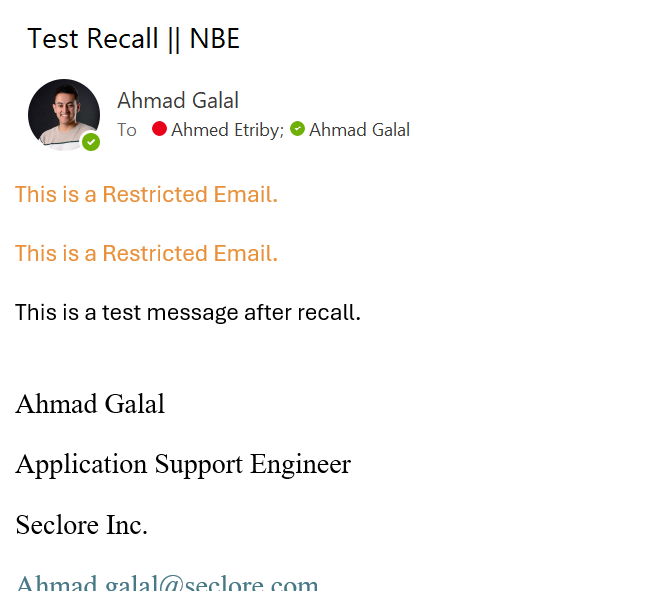
When a user recalls an already sent email, edits it, and then resends it, duplicate classification headers (visual markings) appear in the email.
Observed Behaviour
- The resent email contains multiple classification headers
- Both the original header (or footer) and a newly applied header (or footer) are visible within the same email
Reason for the Behaviour
This behaviour is expected by design due to how Outlook and the classification engine handle the resend action:
- The “Resend Email” action in Outlook is treated as a new mail event
- The classification engine applies the visual marking again based on the selected (or mandatory) classification
- The original header is retained because it is part of the email body/content
As a result:
Both the original and newly applied classification headers appear together in the same email
Recommendation:
- If changes are required to a classified email, we recommend composing a new email rather than using the Resend option, to avoid duplicated visual markings.
Ref. Cases 104219