Purpose
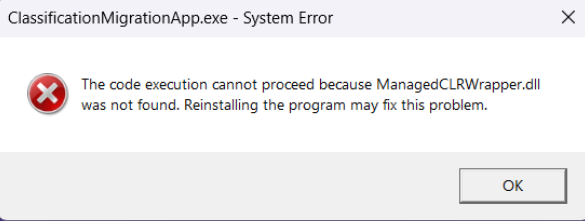
This article explains how to identify and resolve an error that appears after every restart of a Windows machine with Seclore Data Classification (DC) components installed.
Symptoms
- Error appears on every startup of the machine.
- Related to Classification Migration (CM) functionality.
- The system may appear to function normally, but the pop-up disrupts user experience.
Root Cause
The root cause of the error is version incompatibility between the Seclore core components and the Classification Migration component:
- The core version of Seclore DC was upgraded via a patch.
- The Classification Migration (CM) component is not compatible with the upgraded core version.
- After the core upgrade, CM components stop functioning.
- Whenever the machine starts, Classification Migration automatically runs, fails due to incompatibility, and triggers the error pop-up.
Resolution
To resolve the error:
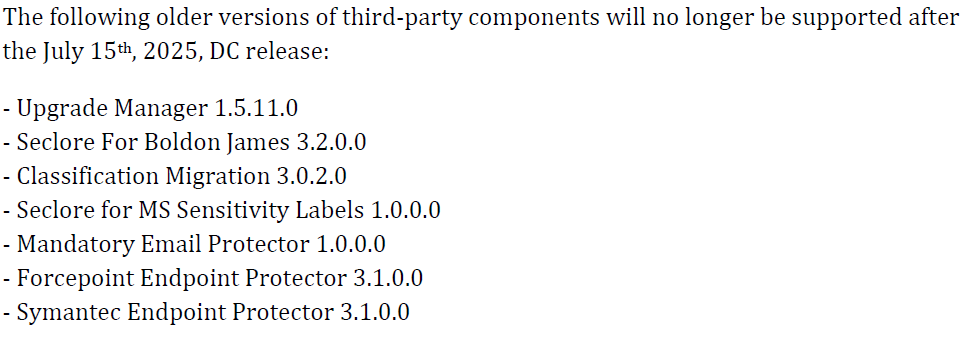
- Upgrade Classification Migration Component
- Install a version of Classification Migration that is compatible with the upgraded core component. (See the attached document)
- Restart the Machine
- After updating the CM component, restart the system to verify that the error no longer appears.
- Verify Functionality
- Verify that the pop up does not appear and Seclore functions are working as expected.
